Accessing
and managing Gravitational Waves data
V.1. Accessing
frames through the Framelib
The
Framelib is integrated into VEGA. This means that all the usual functions are
accessible to the command line and in the macros. For example, you can try to
run the macro vframel_ex.C. We let you compare it with the example FrameFull.c
of the Framelib manual.
There
is a way to draw the time series (vectors) extracted from frames, and this is
described in the chapter "
VI. Representing Gravitational Waves data
".
V.2. Metadatabase
for easy data access
V.2.1. What
for ?
In
a GW detection experiment, we will certainly end-up analyzing BIG amounts of
data. Even if the format of these data is determined, the data itself will
consist of many hundreds of files, each consisting of many megabytes. This is
true even in local data that a user may want to analyze on his machine.
Furthermore, when somebody uses some files locally, chances are that those
files contain frames that are not contiguous, consisting of chunks of
interesting data scattered through all the time the experiment was running. How
then, access this data by time ? Or by frame/run number ?
If
someone wants eventually to have headaches, one of the solutions might be to
give each file a meaningful name, containing for example the start time of the
first frame in that file, and be very disciplined. But what if somebody wants
to access a part of the data that spans two or more frames ? This, and other
such questions, lead to the idea of a metadatabase.
Suppose
we have a bunch of frame files in a directory. We create a database, consisting
in our case of a ROOT file containing two Trees, that will index the location
(file), start time, and other interesting parameters (trigger conditions...) of
all the frames present in the directory files.
In
order to access one particular frame, one just has to give it's time to the
metadatabase, that will send him back this frame. We will see all the
possibilities of this approach.
V.2.2. Principle
and structure
From
the user's point of view, the analysis environment should allow her/him to
access simply any vector or frame that is contained in a set of frame files,
even remotely. One should also be able to access vector not caring about frame
boundaries. It should also be possible to make accesses conditionned by some
trigger, slow monitoring value or user-defined condition. Furthermore, one
should be able to manage a set of files that is as big as possible (of the
order of 1 TB or more)
The
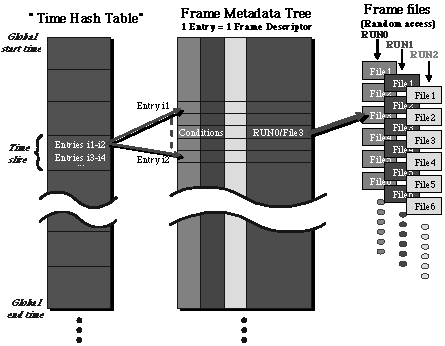
option chosen in VEGA to solve this problem is to build a database that
contains metadata about frames and indexes these frames. The structure of the
database is drawn on the following figure :
The
complete frame information is kept in the frame files, while the database
serves as an index to access them. The access is a two step process. First, one
gives the starting time of the vector one wants. This starting time is used to
determine, with the help of what is called a "time hash table", the frame files
that possibly contain the desired information. Then, only the metadata
corresponding to these files are searched and finally, the desired frame is
accessed in the relevant file or the desired vector is reconstructed and given
to the user.
The
metadata is kept in a container, called Tree, introduced in ROOT and
specifically designed to handle big amounts of data and access it quickly. The
tree structure can also contain conditions for frame access.
V.2.3. Creation
of a metadatabase
- VFrDataBase(char*
filename, char* mode, char* framefilenames, char* opt)
To
create a local database, we need to create a database object of class
VFrDataBase. At the same time, we can build it, looking for frame files. As,
for example, in
vega[1]
vd
= new VFrDataBase("demoDB.root","CREATE","./")
we
call the VFrDataBase constructor.
The
first parameter is the name of the database file.
The
second one is the mode with which we open the database. Here, it is opened in
"CREATE" mode, since we want to build it.
he
third parameter is the path to the directory containing the frame files. Here,
it is "./", meaning the local directory. You can put whatever path you like and
specify particular files/directories with wildcards.
The
search is by default recursive, all the contained directories will be searched
recursively. If you want to turn this option off, add a last parameter and
specify "S"
That's
it ! The amount of time needed to index the files depends on the number and
size of those files. But typically, it consists of a sequential read of all the
files. This shouldn't be much slower than the speed of the connection to the
disk containing the directories.
V.2.4. Accessing
data through a metadatabase
V.2.4.1. Opening
an existing database
To
easily access the data, we need first to open a database. We can use the
constructor in "READ" mode, which is the default :
vega[0]
vd
= new VFrDataBase("./demoDB.root")
One
may replace "./demoDB.root" with the path/name of his local database.
V.2.4.2. Extracting
frames
Frames
are extracted from the database with
- FrameH*
GetFrame(Double_t time)
- FrameH*
GetFrameR(Double_t relativetime)
The
first method extracts a frame at an absolute time, the second at a time
relative to the reference time (see chapter ”Dealing with time”).
As
in
vega[2]
FrameH*
frame = vd->GetFrame(time)
where
time is a double expressing a time that is contained in the frame. This method
sends back a pointer to a well known FrameH structure.
Once
one has extracted one frame, it is possible to extract the next one or the
preceding one in the database :
- FrameH*
GetNextFrame()
For
example :
vega[3]
frame
= vd->GetNextFrame()
or
- FrameH*
GetPreviousFrame()
For
example :
vega[4]
frame
= vd->GetPreviousFrame()
Be
careful, while GetFrame is checking to see if the requested time is really
contained in one of the frames of the database, GetNextFrame and
GetPreviousFrame do not. They will simply return you the frame that is the next
(or previous) one in time in the database, even if it's years away.
V.2.4.3. Extracting
vectors of any length
Sometimes,
one would like to extract a vector which length is smaller than the one of a
frame, or a vector that is spanning two or more frames. One can extract such a
vector with :
- FrVect*
GetVect(Text_t* nameofvect, Double_t start, Double_t length)
- FrVect*
GetVectR(Text_t* nameofvect, Double_t start, Double_t length)
The
first method extracts a frame at an absolute time, the second at a time
relative to the reference time (see chapter ”Dealing with time”).
As,
for example :
vega[2]
FrVect*
vect = vd->GetVect("adc.IFO_DMRO",start,length)
It
returns a vector of type FrVect given it's name and type. The vector starts at
time "start" and has a length "length" (both are doubles). Vectors extracted
from the database will be concatenated as needed to obtain the desired vector.
The string nameofvect indicates the type (adc, proc, sim) and the name of the
series to be extracted. The convention for the format is "type.name".
For
example "adc.IFO_DMRO" is a good format.
If
only the name is given, the groups of series in the frame will be searched in
the order adc, proc, sim for that name. If more than one identical name was
defined in the frame, the first found series with that name will be used.
V.2.4.4. Extracting
n-tuples of SMS data
As
was seen in the chapter ”IV – Hands on VEGA”, in order to
manipulate slow monitoring data, one has first to extract them in an ntuple.
This is done with the VFrDataBase methods :
- VNtuple*
ExtractSMS(Text_t* nameofntuple, Text_t* varlist, Double_t start, Double_t
length)
- VNtuple*
ExtractSMSR(Text_t* nameofntuple, Text_t* varlist, Double_t start, Double_t
length)
The
first method extracts an SMS at an absolute time, the second at a time relative
to the reference time (see chapter ”Dealing with time”).
- nameofntuple
is the name of the new ntuple to be build.
- varlist
is
the list of variables to extract. The variables are separated by colons, and
each variable name is constructed with the name of the slow monitoring station,
followed by the name of the variable, separated by a dot, like
stationname.varname. So ”TiServer.TA1:TiServer.T2:To9Tp.G41” is a
valid variables list. If one wants to extract all the variables of a station,
just give the name of the station, without any variable.
”TiServer:To9Tp” will work (of course if these stations exist).
- start
is the time from which the extraction starts in the database. It is an absolute
GPS time for the
ExtractSMS
method and a time relative to the reference time for
ExtractSMSR.
- length
is the length of the extraction section, in seconds.
The
variables and slow monitoring stations are checked for in the first frame
accessible after the time
start.
If the variables names was given, the search will be made until the end of the
searching section (till the time start+length is reached). But if all the
variables of a station were asked for, and this station is not present, the
ntuple will not be build.
V.2.5. Getting
general information about the metadatabase and it’s contents
V.2.5.1. Getting
the start time of the metadatabase
To
get the start time of the first frame indexed in the metadatabase, one has to
use the VFrDataBase method
- double
GetStart()
For
example if vd is a valid database,
vega[]
vd->GetStart()
will
output this start time while
vega[]
st
= vd->GetStart()
will
put it in a double that may be reused.
V.2.5.2. Printing
information about the metadatabase
One
can get some information about the metadatabase by using the VFrDataBase method
- double
Print()
For
example if vd is a valid database,
vega[]
vd->Print()
This
will show a rather extensive output of the metadatabase’s content, and
will print the dump of the first frame at the end. This may be used to collect
names of vectors, etc....
V.3. Dealing
with selected or triggered data
V.3.1. Condition
information in the metadatabase
V.3.2. Condition
formulae
V.3.3. Extracting
frames with a condition
V.4. N-tuples
adapted for GW data analysis
Slow
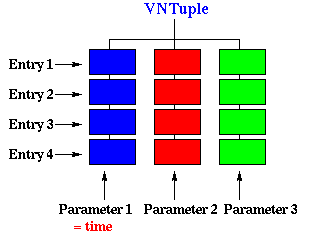
monitoring data spans a lot of frames. The special treatment we have to apply
in order to gain a simple yet efficient way of dealing with SMS data is to
build a special object called an ntuple that will contain all this data. We
developed a particular ntuple (VNtuple) that differs from the standard ROOT one
in that it is adapted to our needs. You can think of an ntuple as a list of all
the sms data put in a tree-like structure :
The
difference with a simple array is that each leaf of the tree can be any kind of
object, even a tree itself. This leads to a hierarchy structure, like in a
directory structure for a file system.
In
fact, these more general ntuples are called Trees. In simple ntuples, as
VNtuples each leaf is a single float parameter.
VNtuples
are derived from ROOT TNtuples and therefore, have access to all the methods
available in TNtuples. We will focus on the ones that were added and on the
ones most frequently used. For the others, the reader may refer to
http://root.cern.ch/root/html/TNtuple.html.
Building
VNtuple
The
standard constructor is :
- VNtuple(Text_t*
name, Text_t* title, Text_t* listofvariables, Int_t bufsize=32000);
- name
is the name of the new VNtuple.
- title
is it’s title.
- listofvariables
is the list of variables to be put in the ntuple. It is a char string made of
names separated by colons. For example "t:x:y:z:var1". This list will tell what
is the number of variables to be foreseen.
- bufsize
is the buffer size used internally when writing to disk. The default value is
sufficient for most uses.
Example
:
vnt
= new VNtuple("vnt","Example vntuple","t:TP1:TP2:PR1:PR2")
will
build a new ntuple object with 5 variables. In a compiled program, vnt has to
be declared as a VNtuple* before use. It will be automatically declared if one
uses the interpreter.
V.4.2. Filling
an N-tuple and getting data
The
ExtractSMS method of VFrDataBase does the job for you in case you want to
extract SMS data. It is nevertheless useful to know how to fill an ntuple and
access the data that is inside it, in case you want to loop on this data.
- void
Fill(Float_t* x)
- void
Fill(Float_t x0, Float_t x1, Float_t x2=0, Float_t x3=0, Float_t x4=0, Float_t
x5=0, Float_t x6=0, Float_t x7=0, Float_t x8=0, Float_t x9=0, Float_t x10=0,
Float_t x11=0, Float_t x12=0, Float_t x13=0, Float_t x14=0)
- x
is an array of floats.
- x0
to x14
in case you have less than 15 variables and more than 1 (2 or more), you can
call the second form of the Fill method.
Example
:
vnt->Fill(1.43,4.23,b,c,d)
will
fill the ntuple with the values specified.
One
can fill an ntuple in a loop as much as he wants, especially if the ntuple is
on disk. To make an ntuple on disk, simply open a ROOT file in
”RECREATE” mode BEFORE building the ntuple. This one will
automatically be attached to the file and it’s contents will be flushed
to disk as soon as the buffers are full (every 32 kbytes by default).
- void
GetEntry(Int_t i)
- Float_t*
GetArgs()
Extracts
the variables corresponding to a given entry in the ntuple.
- i
is the index of the entry (in filling order).
GetEntry()
fills an internal array with the contents of entry i and GetArgs() returns a
pointer to an array of floats containing the values. There are two different
methods because in the case of Trees, the objects to be returned may be very
complex, and one can try to get only a subset of these objects.
The
GetEntries()
method returns the number of entries in the ntuple.
A
simple loop to process all the values of an ntuple would be :
while ( int i=0; i < vnt->GetEntries(); i++ ) {
vnt->GetEntry(i);
float* x = vnt->GetArgs();
printf("nvar = %d, x0 = %fn",nvar,x[0]);
}
Of
course, one can do any kind of treatment in the loop
If
it’s just a matter of printing the values, the Scan() method may be used.
The previous example could be replaced by a simple
vnt->Scan()
call.
V.4.3. Drawing
Damir BUSKULIC
Last update :05/24/00